
Why do I get the error "Unsupported request - method type: POST" when trying to launch a Collection Ad?
If you're seeing the following error message while trying to launch Collection Ads, this is most likely due to missing permissions on the connected Facebook Page.
"Unsupported request – method type: POST"
What does this error mean?
This error comes from Meta’s API. Specifically, it refers to the platform attempting to make a POST request to create an Instant Experience, which is the core format behind Collection Ads. Unlike regular ads, Collection Ads require publishing-level permissions on the Facebook Page because their creative (photo or video) is uploaded directly to the Page, not just the ad account.
How to fix it 💡
To successfully launch Collection Ads, the owner of the Facebook integration connected to Kitchn.io must not only have access to run ads for the Page, but also permissions to publish content to it.
To verify this:
Go to your Business Manager
Navigate to: Business Settings > People > [Connected User] > Pages
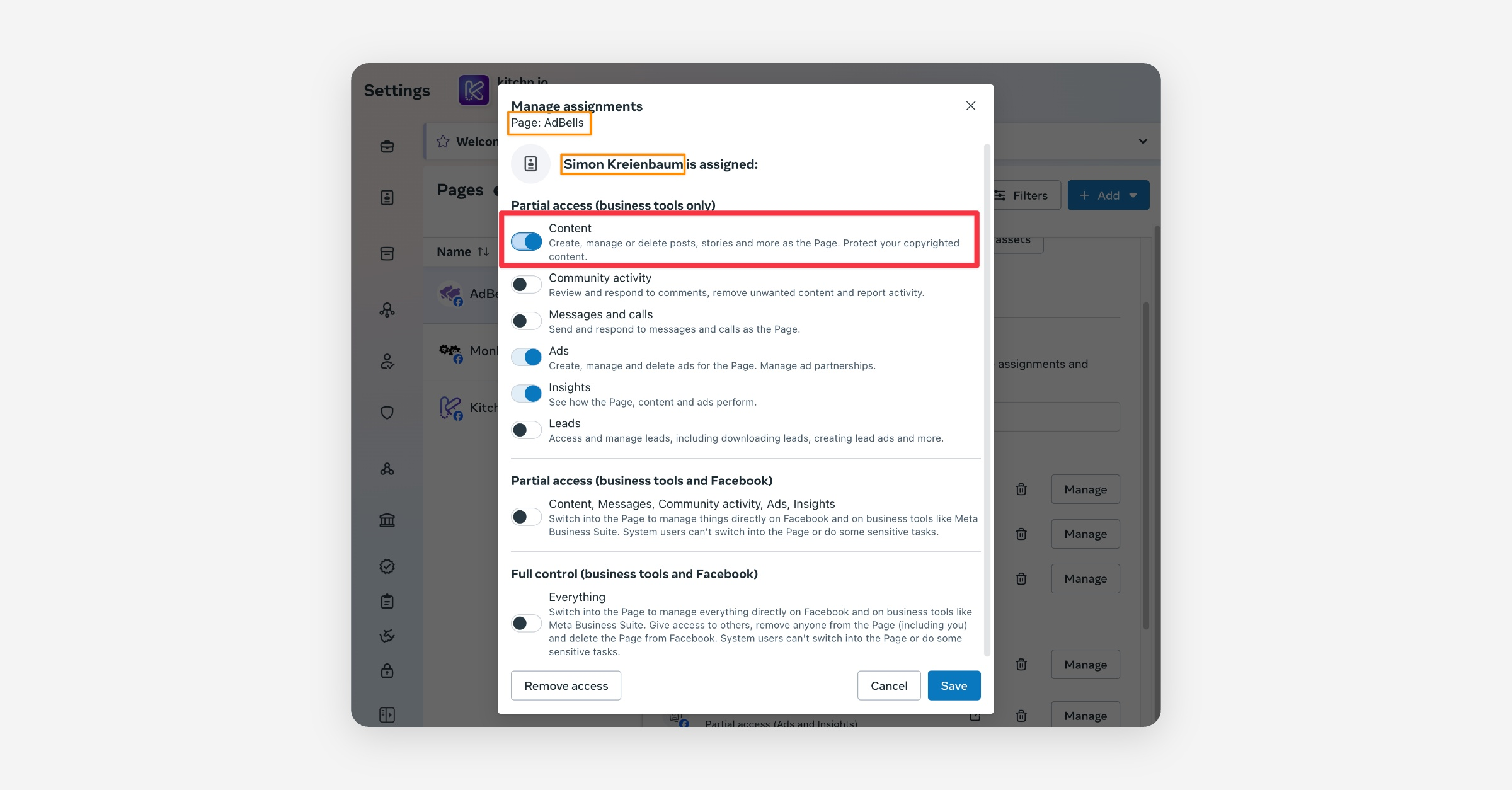
Ensure that the necessary permissions are granted for the Page:
Content (this is only necessary for Image Collection Ads)
Ads
Make sure the "Content" permissions are added for the relevant page (here: AdBells) and user (here: Simon Kreienbaum)
Once this is updated, feel free to refresh your launch sheet and try again. It should work as expected then!